Step 1 / 3 - Take the CA State Required Guard Card Class
In the first step, you need purchase and complete the 8-hour CA State Required Power to Arrest and Weapons of Mass Destruction training course.
On our website, it's called the Guard Card Class. To do that:
- Purchase either the 8-hour Guard Card Class, or the 40-Hour BSIS Full Package. To start the purchase, click the Buy Now link from either our Home page, or from the product pages linked above.
- Follow the simple on screen instructions to create a training account on our website.
- Continue to the Online Payments page, click Pay Now and pay the course fee.
- Complete the online course on our website.
- Print your training certificate when you complete the 8-Hour Guard Card Class. Please note that you can view or print the certificate for the course any time you log in after completing the course.
Step 2 / 3 - Get Fingerprinted at a Live Scan Location:
In the second step, you need to get fingerprinted by Live Scan. To do that:
- Find a Live Scan location in your area:
- Click Here to find the location nearest to you. - Obtain the Security Guard Live Scan form from the BSIS:
- Download Security Guard Live Scan form.
If you plan to obtain a CA State BSIS firearm permit within the next 12 months, then use this form:
- Download Security Guard with Firearm Live Scan form. - Complete all three copies of the form.
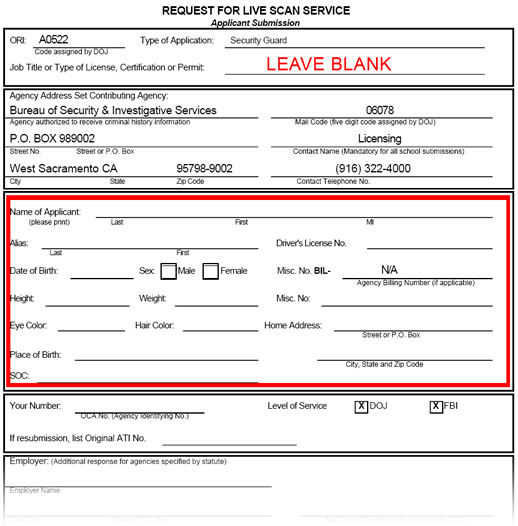
Fill out only the information about yourself, as shown in the RED box below.
- Go to the Live Scan location with your completed forms and get fingerprinted.
At that point you are done with Live Scan, you do not need to mail anything in. You can proceed to the third step.
Step 3 / 3 - Complete the CA State Security Guard Application:
In the third and final step, you need to submit the CA State BSIS Security Guard Application. To do that:
- Go to the CA State Department of Consumer Affairs website at: CA State Breeze Online License Application System to submit the online CA State Security Guard Application. On that page, you need to click the link that says New Users - Breeze Registration on the lower right side of the page.
- Create an account within their system, and then login to the account, and follow the online instructions.
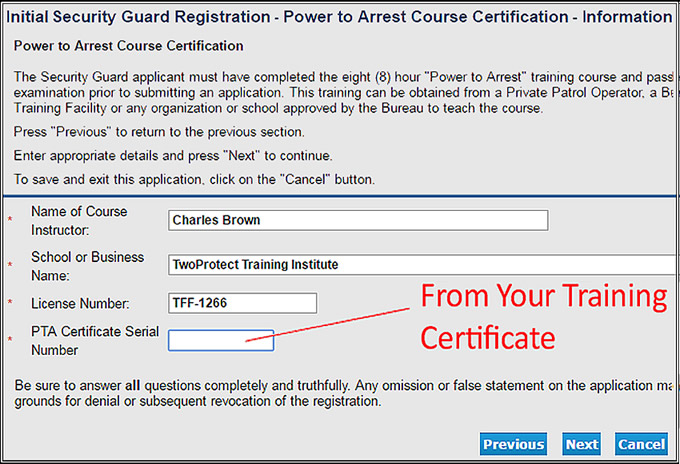
- Please make sure to use the info listed on your training certificate.
This includes Instructor's name, School or Business Name, Our License # (TFF-1266), and your Certificate Serial Number.
Application Processing Times
Once your application is submitted to the BSIS, it takes them an average of 7 to 15 business days to process. A few people get cleared in as few as 5 days, but for others it takes 3-6 weeks. And, if you have anything at all on your criminal record, it typically takes the BSIS 4-8 weeks to process your application.
To check if your application has been cleared (approved) by the BSIS, you can go back to the CA State Breeze website, and click the License Search button on the home page. Your license will only appear in the search results once you are cleared.
You can also call the BSIS directly at: (800) 952-5210
You can call the Breeze website support at: (916) 557-1208